# (Practice 2-2) Controlling LEDs in Desired Shapes\_Advanced ver
{% hint style="info" %}
(Practice 2-2) To control LEDs in the desired shapes - Advanced, you need to understand the concepts of \[Lists] and \[Loops].
{% endhint %}
### Example Code
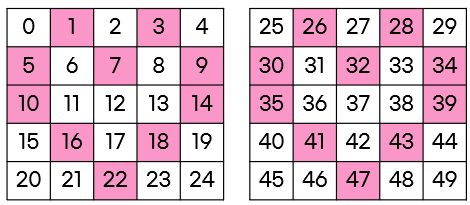
(Example) Turning on LED in Heart Shape (R:250, G:150, B:150)
하트모양 LED 번호
**(1-1) When Storing All LEDs in the heart Variable**
* Create a heart \[variable] and declare a \[list] with the LED numbers required for the heart shape.
* Use the \[Repeat List] block to set the LED colors.
**(1-2) When Storing LED Numbers Required for the Left Heart Shape**
* Create a heart \[variable] and declare a \[list] with the LED numbers required for the left heart shape.
* Use the \[Repeat List] block to set the LED colors.
* To set the left and right LEDs in the same shape, set the LED at the position of the left LED number + 25 to the desired color.